
Docs › Stats: who's visiting
Stats: who's visiting
All plansViews, visits, top pages, and where visitors came from — counted anonymously, right in your dashboard.
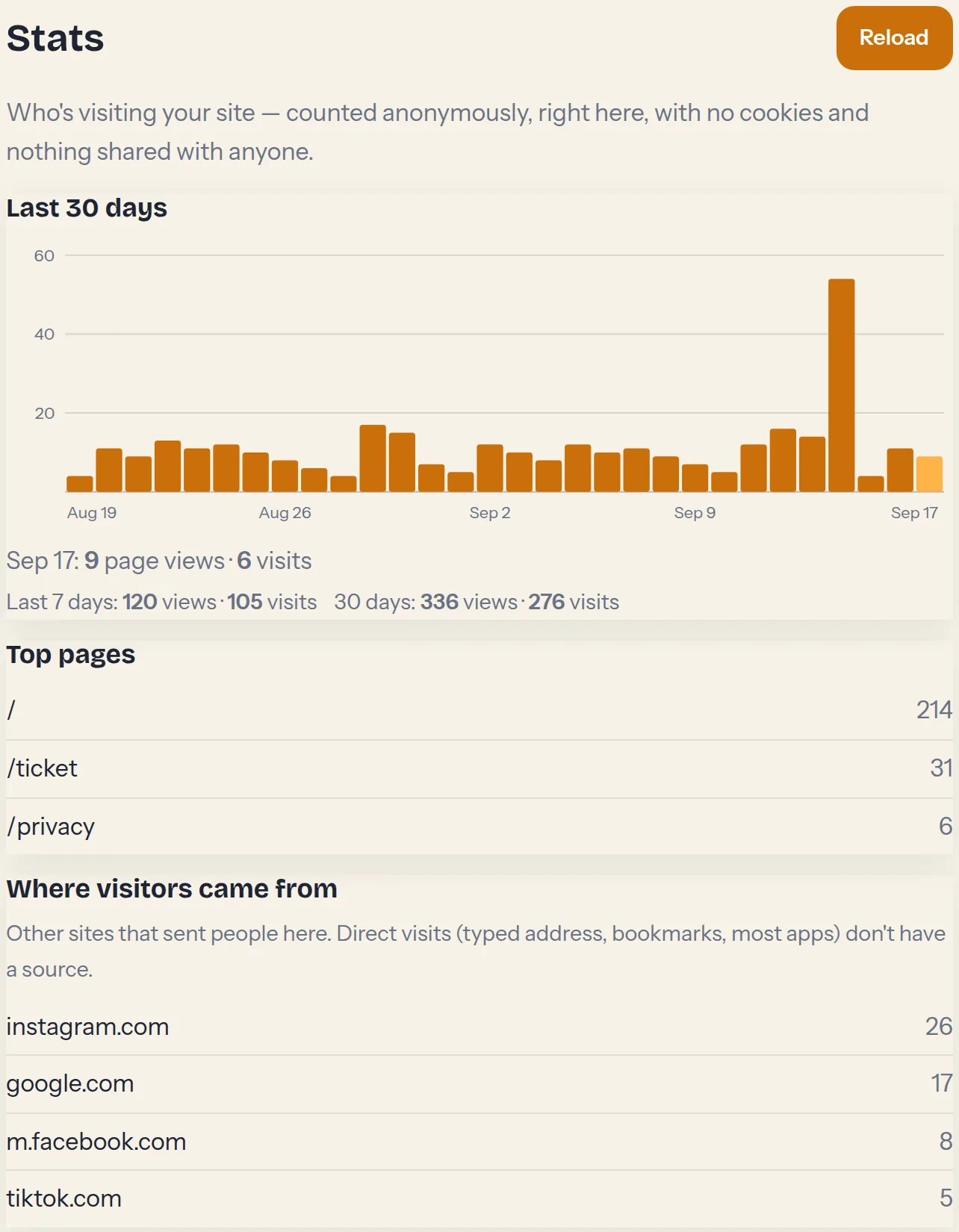
- Open Stats in the dashboard. The chart shows the last 30 days of page views — tap any bar and it tells you exactly what that day did, like Sep 13: 54 page views · 53 visits.
- Under the chart, last-7-days totals sit next to the 30-day totals, so you can tell whether this week is up or down at a glance.
- Top pages shows which pages people actually open.
- Where visitors came from lists the sites that sent people your way — Instagram, Google, a local directory. Direct visits (typed address, bookmarks, most apps) don't carry a source, so a short list here is normal.
Counting is anonymous and first-party: no cookies, no trackers, nothing that identifies your visitors, and the numbers are only visible in your dashboard. A view is a page being opened; a visit is a browsing session — one person reading three pages is three views, one visit. Counting starts the day your site got this feature, so the chart fills in as days pass.